RC790 Payment Summary Reconciliation Report
This report is used to reconcile payment summary totals to payroll totals. It is recommended that Report RG051 - YTD Paytype Reconciliation Report is also run to assist with the reconciliation process. RC791 - Payments not Processed by Payment Summaries (generated as part of the Generate Payment Summaries chain) can also assist the reconciliation process.
 Please note: The foot of the RC790 report will list employees who have a negative value on their Payment Summary or where the total Tax withheld is greater than the total Gross reported. These Payment Summaries must be cancelled before processing may continue. The ATO will not accept Payment Summaries where this is the case.
To assist the reconciliation of Payment Summary totals for clients who outsource Payment Summary printing to another party and whom have a combination of some employees receiving a Web Only Payment Summary and some employees having Hard Copy Payment Summaries RC790 will show totals for Web Only Payment Summaries, totals for Hard Copy Printed payment Summaries and a grand total of all Payment Summaries.
If you have generated Payment Summaries in Update, you may run RC790 as a stand-alone report to assist with reconciliation. RC790 - Payment Summary Reconciliation Report run outside the Generate Payment Summaries chain can be selected from menu 0637 - Process Payment Summaries.
Please note: Payment Summary Reconciliation should only be generated when logged on to aPay as wither the Master User or a General User i.e. should not be run by a Range or Clevel User.
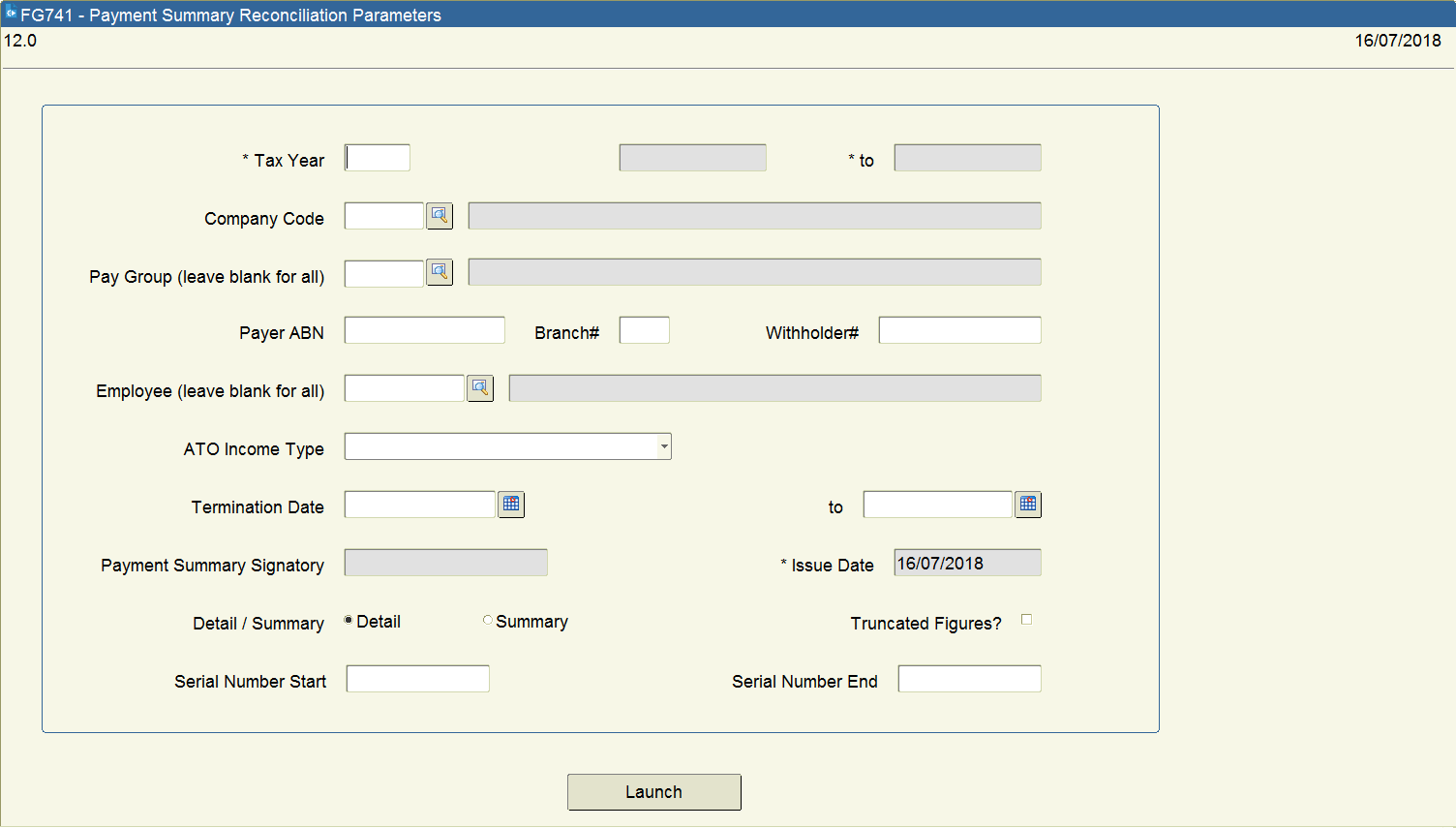
A description of the parameters is as follows:
Field Descriptions:
Tax Year Enter the Tax year for which you wish to generate a Reconciliation Report.
The dates relating to that tax year will display but may be overridden. You may, for example wish to produce a report for a 3-month period within the tax year.
Company Code If you wish to run Payment Summaries for a specific company, enter the Company Code within this field. The description of the Company will be displayed.
If you enter a Company Code, the fields Payer ABN, Branch #, Withholder # and Payment Summary Signature will be automatically populated with the information relevant to that Company and only employee/jobs currently attached to that company_code will have a payment summary generated.
If this field is left blank, Payment Summaries will be produced for all Companies, which meet other entered selection criteria.
Pay Group If you wish to run this report for only one Pay Group, enter the Pay Group within this field. The description of the Pay Group will be displayed.
If this field is left blank, all Pay Groups, which meet other entered selection criteria, will be included in the report.
Payer ABN If you wish to run this report for all payees covered by one Payer ABN number, enter the number within this field.
If this field is left blank, all payees who meet other entered selection criteria will be included in the report.
Branch# If you have chosen to enter a Payer ABN and wish to restrict the report to a particular Branch#, enter the Branch Number within this field. If you leave this field blank the report will include all payees included in the Payer ABN.
Withholder# If you wish to run this report for all payees covered by one Withholder#, enter the number within this field. If this field is left blank, all payees who meet other entered selection criteria will be included in the report.
Employee You may choose to run this report for one payee only. If you enter the Employee#, the payee’s name will be displayed for verification.
Please note: The results will be aggregated (where applicable) for all jobs for the selected payee within each payment summary run.
If this field is left blank, all payees who meet other entered selection criteria will be included in the report.
ATO Income Type You may run the report for a selected Income Type only.
If this field is left blank, all payees who meet other entered selection criteria will be included in the report.
Termination Date If you wish to run this report for terminated payees only, enter a date range to restrict the report to these dates.
Issue Date Will default in today’s date (system date) and cannot be changed.
Detail/Summary You may choose to run this report in either Detail or Summary mode.
Detail mode will give full details of every pay type for each aggregated payee/income type/payer ABN/Branch/Withholder# combination, with totals by pay type for employees and non-employees and a grand total.
Summary mode will only give the aggregated payee/income type/payer ABN/Branch/Withholder# combination totals for employees and non-employees and the grand total. Enter either ‘D’ or ‘S’.
Truncated Figures Y/N This report may be run in truncated mode or with full details of dollars and cents for each pay type.
Truncated mode will give the figures to balance to the Payment Summaries.
Non-truncated mode will give full figures to balance to your payroll.
Enter either ‘Y’ or ‘N’.
· The report will be sorted in the order defined in the CON_DEF PS_ORDER_BY.
· The parameters entered when running the report will be printed on the front page of the report.
· The details reported for each Income Type will vary according to the requirements of the ATO.
· The Tax on RC790 should equal the total tax YTD on RC427, which was produced in the last payrun of the financial year.
& To assist the reconciliation of payment summary totals to payroll totals report RG051 - YTD Paytype Reconciliation Report and RC791 - Records not Processed on Payment Summaries may be of some help.
RC790 PAYMENT SUMMARY RECONCILIATION REPORT EXAMPLE
RC790 is divided into several sections, below is an extract of information showing the report output for each section:
EXTRACT OF RC790 SHOWING PARAMETERS:
|
14-MAY-2009, 02:01pm TEST1101
RC790 17.1 aPay Human Resource Management System
Payment Summary Reconciliation Report Page 1
From: 01-JUL-2008 to 30-JUN-2009 DETAILED REPORT
PARAMETERS
===========================================================================
Tax Start Date : 01-JUL-2008
Tax End Date : 30-JUN-2009
Company Code : AG
Pay Group : AG
Payer ABN : 10000000000
Payer Branch# :
Payer Withholder# :
Employee# :
ATO Income Type :
Termination start date :
Termination end date :
Certificate Run Number : 269
Detail/Summary Flag : D
Truncated Values? : N
Start Serial# :
End Serial# :
Update Flag : N
|
EXTRACT OF RC790 SHOWING EMPLOYEE PAYMENT SUMMARY DETAILS:
|
EMPLOYEE - PAYEES
------------------------------------------------------------------------------------------------------------------------
Employee# AG1007 Gross $ 126559.67 Lump Sum: (A) $
Job# Other Income $ (B) $
Employee Name GRIGG, Emily Allowances $ 520.00 (C) $
Serial# 13091 Tax $ 5960.00 (D) $
Income Type Salary or wage income CDEP $ (E) $
Withholding Tax FBT $ Reportable Super $
Deductions $ Foreign Income $
Workplace Giving $
---------------------------------------------------------------------------------------------------------------------------
Employee# AG1007 Gross $ Lump Sum: (A) $
Job# 01 Other Income $ (B) $
Employee Name GRIGG, Emily Allowances $ (C) $ 2246.26
Serial# 13092 Tax $ (D) $
Income Type Salary or wage income CDEP $ (E) $
Withholding Tax FBT $ Reportable Super $
FBT Exempt Deductions $ Foreign Income $
Workplace Giving $
-----------------------------------------------------------------------------------------------------------------------
|
EXTRACT OF RC790 SHOWING PAYMENT SUMMARY TOTALS;
|
Employees Printed: Totals - Employees
2 -------------------------------------
Gross 126559.67
Allowances 520.00
Deductions
Workplace Giving
Lump Sum A
Lump Sum B
Lump Sum C 2246.26
Lump Sum D
Lump Sum E
Tax 5960.00
CDEP
Grossed-up FBT
Reportable Super
Foreign Income
14-MAY-2009, 02:01pm TEST1101
RC790 11.1 aPay Human Resource Management System
Payment Summary Reconciliation Report Page 3
From: 01-JUL-2008 to 30-JUN-2009 DETAILED REPORT
NON-EMPLOYEE - PAYEE
---------------------------------------------------------------------------------------------------------------------------
Non-Employees Printed Totals - Non-Employees
----------------------------------------
Gross
Allowances
Lump Sum A
Lump Sum B
Lump Sum C
Lump Sum D
Lump Sum E
Tax
CDEP
Grossed-up FBT
Gross + Allowances
Reportable Super
14-MAY-2009, 02:01pm TEST1101
RC790 17.1 aPay Human Resource Management System
Payment Summary Reconciliation Report Page 4
From: 01-JUL-2008 to 30-JUN-2009 DETAILED REPORT
Web Only Payment
Summaries: Totals - Web Only Payment Summaries
2 --------------------------------------------------
Gross 126559.67
Allowances 520.00
Deductions .00
Workplace Giving .00
Lump Sum A .00
Lump Sum B .00
Lump Sum C 2246.26
Lump Sum D .00
Lump Sum E .00
Tax 5960.00
CDEP .00
Grossed-up FBT .00
Gross + Allowances
Reportable Super .00
Foreign Income .00
Printed Payment
Summaries: Totals - Printed Payment Summaries
--------------------------------------------------
Gross
Allowances
Deductions
Workplace Giving
Lump Sum A
Lump Sum B
Lump Sum C
Lump Sum D
Lump Sum E
Tax
CDEP
Grossed-up FBT
Gross + Allowances
Reportable Super
Foreign Income
14-MAY-2009, 02:01pm TEST1101
RC790 17.1 aPay Human Resource Management System
Payment Summary Reconciliation Report Page 5
From: 01-JUL-2008 to 30-JUN-2009 DETAILED REPORT
******************************************************************************************************************************
Total:
2 Grand Totals - Employees + Non-Employees
---------------------------------------------
Gross 126559.67
Allowances 520.00
Deductions
Workplace Giving
Lump Sum A
Lump Sum B
Lump Sum C 2246.26
Lump Sum D
Lump Sum E
Tax 5960.00
CDEP .00
Grossed-up FBT
Gross + Allowances
Reportable Super
Foreign Income
*****************************************************************************************************************************
|
&To assist the reconciliation of payment summary totals for clients who outsource payment summary printing to another party and whom have a combination of some employees receiving a web only payment summary and some employees having hard copy payment summaries RC790 totals have been split to show totals for Web Only and Hard Copy Printed payment Summaries as well as a grand total.
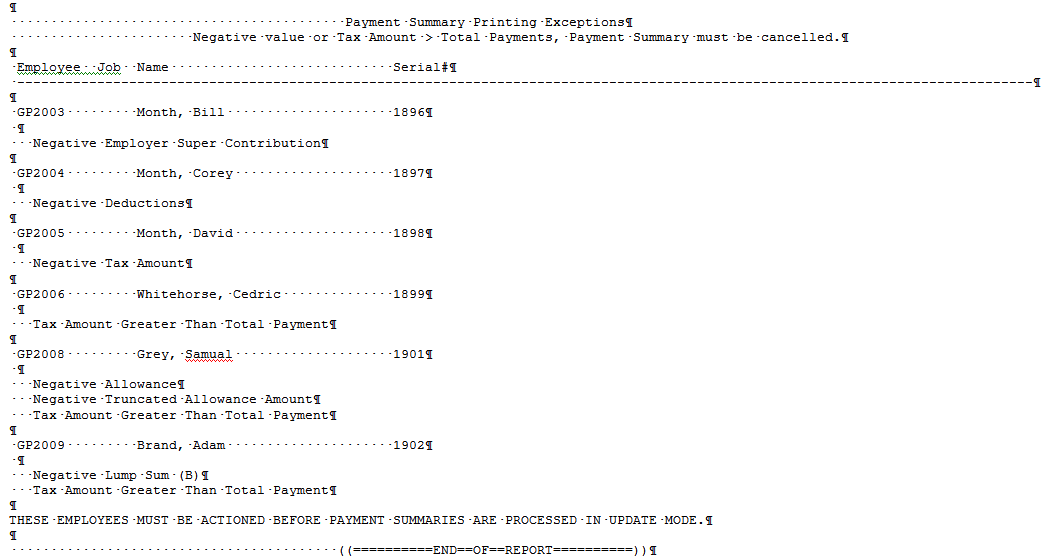
Please note: The foot of the RC790 report will list employees who have a negative value on their Payment Summary or where the total Tax withheld is greater than the total Gross Earnings (Gross + Allowances + Lump Sum amounts) reported. These Payment Summaries must be cancelled before processing may continue. The ATO will not accept Payment Summaries where this is the case.
EXTRACT OF RC790 SHOWING PAYMENT SUMMARY EXCEPTIONS:
RC790 - Payment Summary Reconciliation Report can also be viewed in a CSV file format.
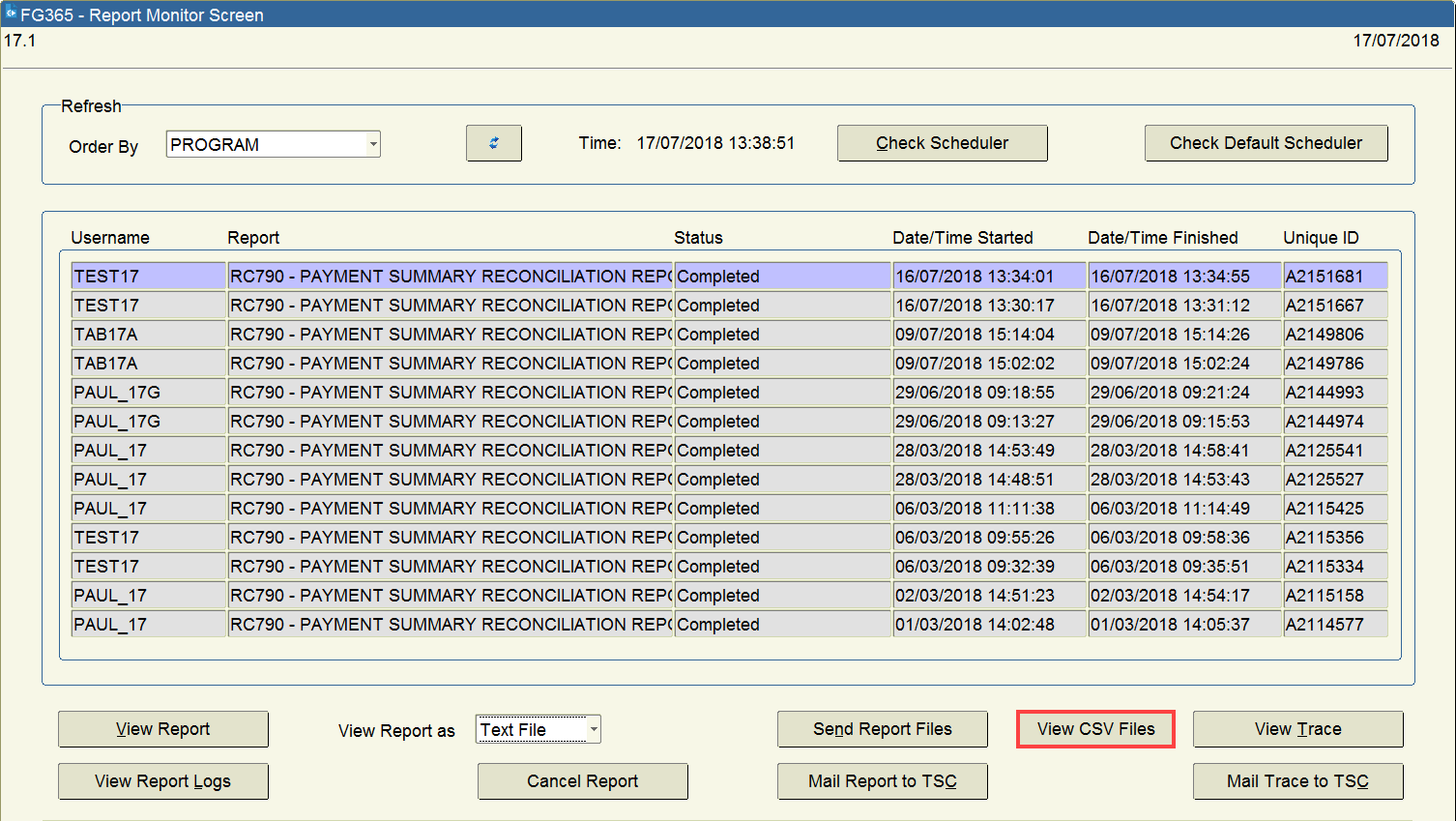
Click on the ‘View CSV Files’ button, then a new window is displayed.
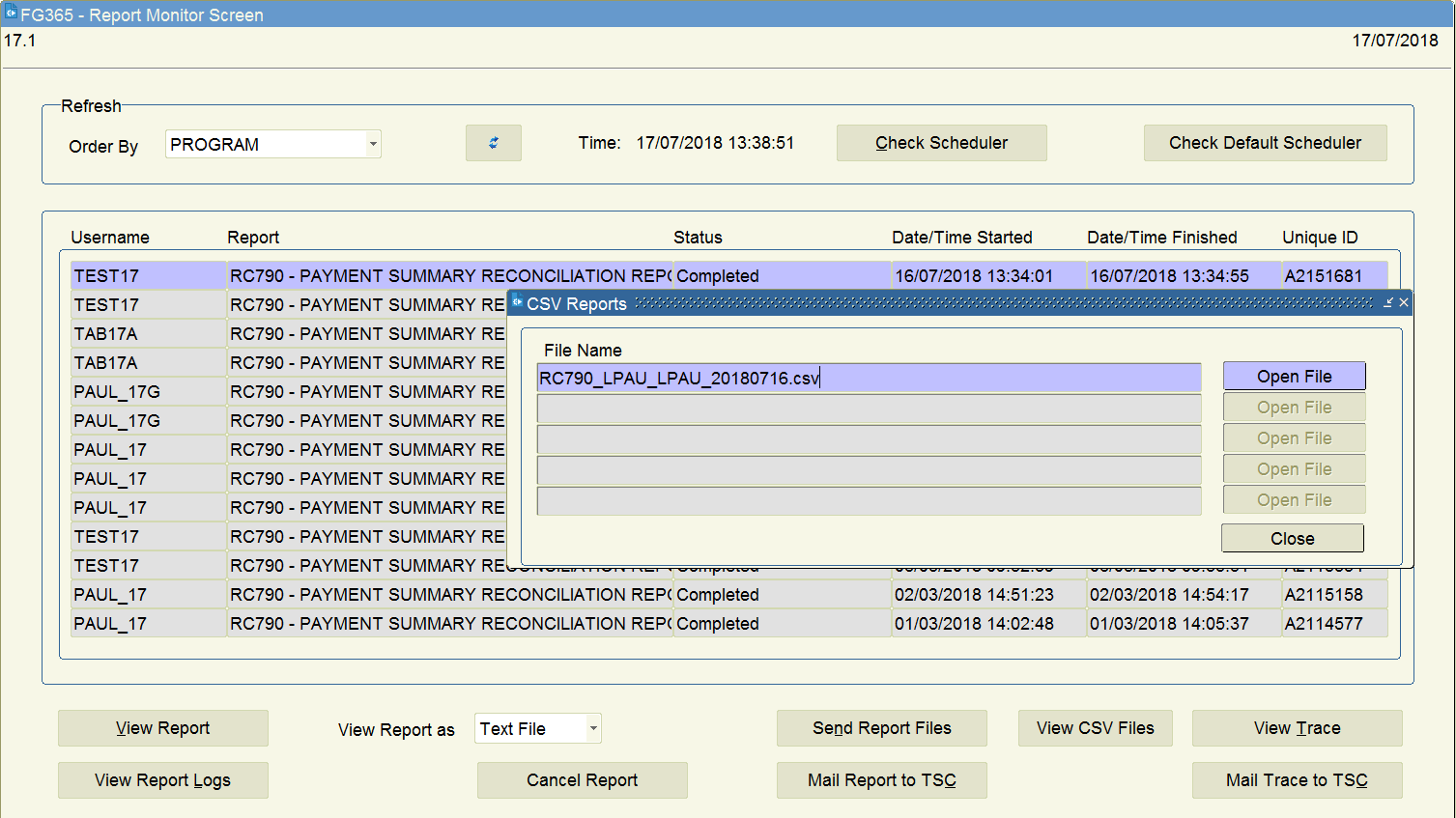
Click on ‘Open File’ button, then the CSV file is displayed.
CSV File is also generated in the Output directory.
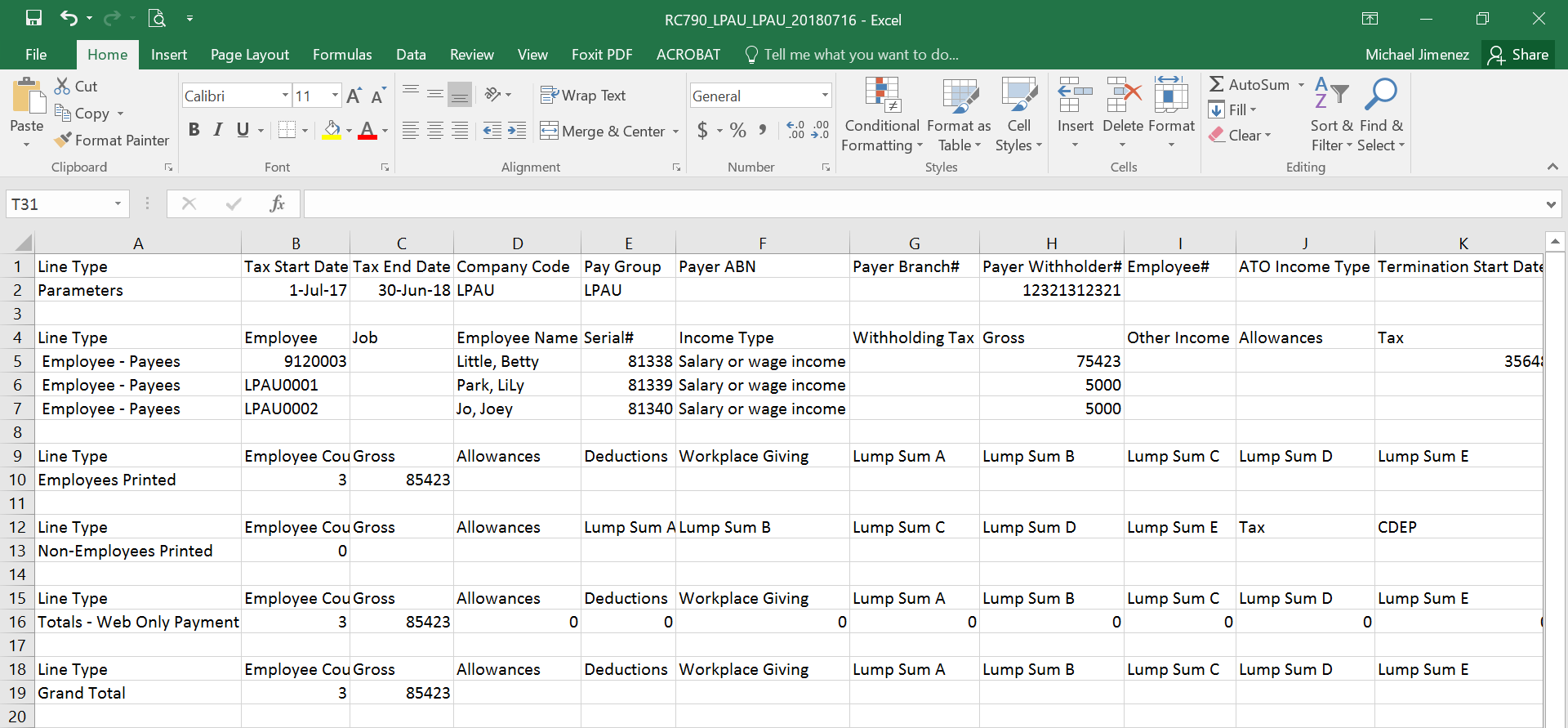
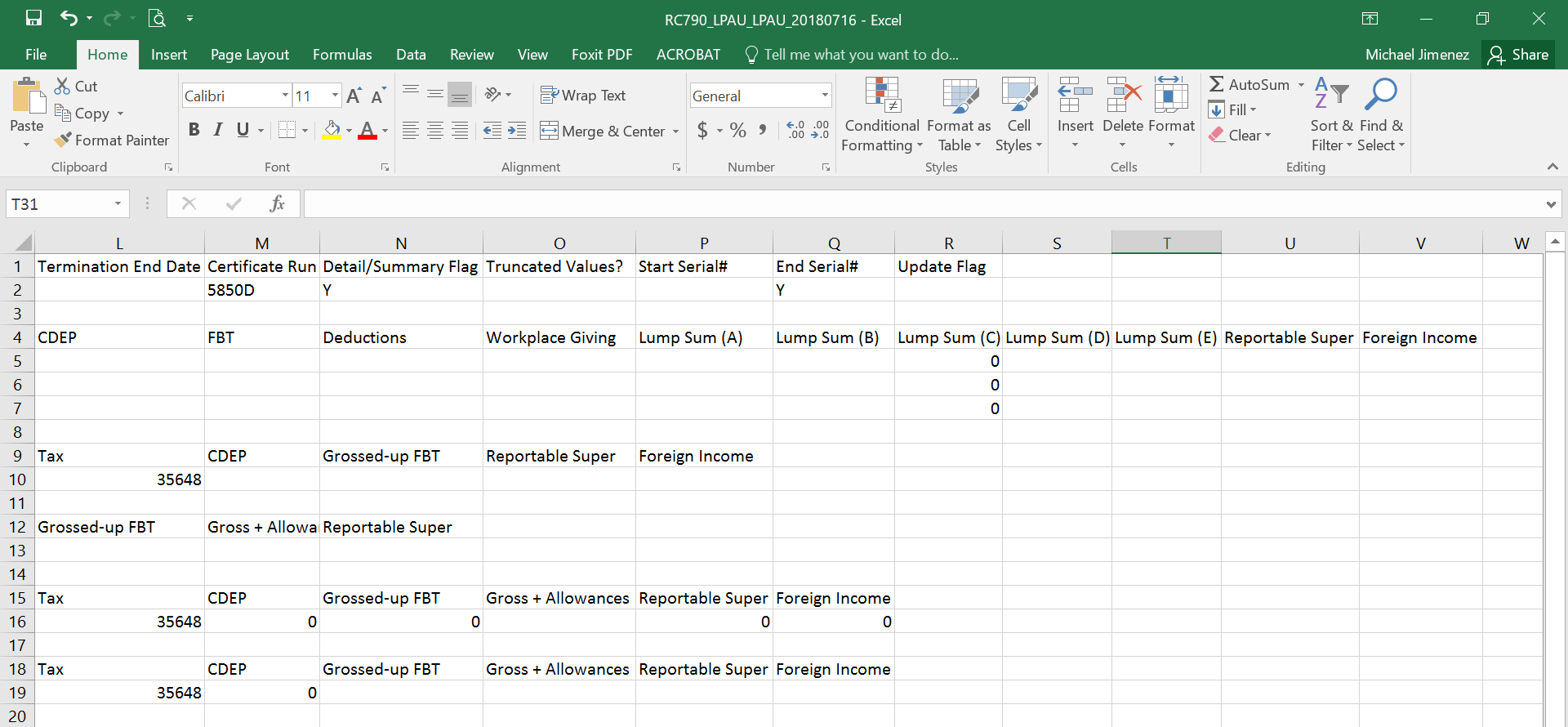
Sample Example: